Creating a Consortia
A Consortia is a type of organization to organization relationship within NetForum. Consortias are used to obtain pricing discounts on subscriptions for various products.
Creating a Consortia
To create a Consortia, complete the following steps:
- Go to to launch the CRM module.
- Click the Organizations group item and use the Find or List functionality to locate the organization that you use to create the consortia.
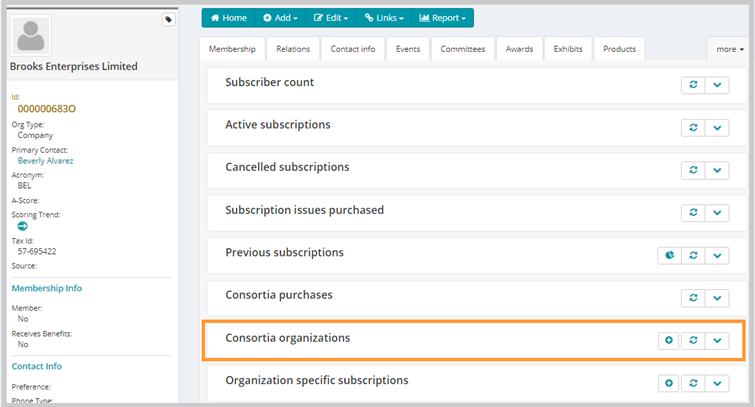
- Click the Subscriptions option to load the Subscription child forms.
- Expand the Consortia Organizations child form. This will list all of the organizations within this organization's consortia (if applicable.)
- Click the Add
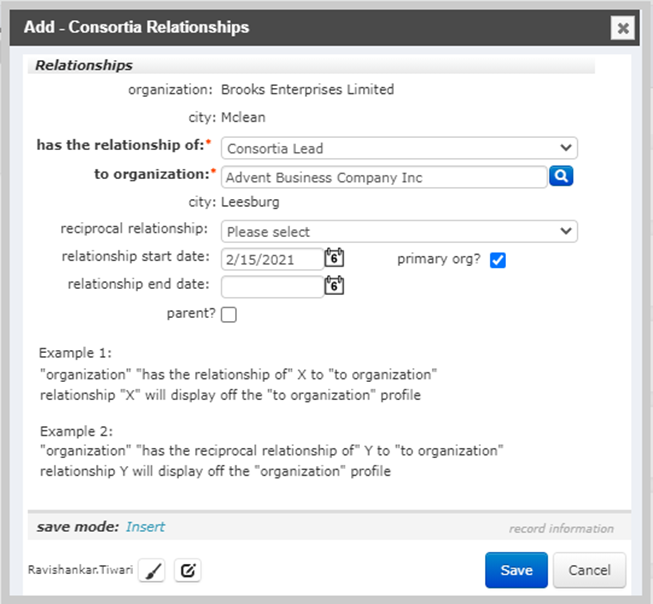
 icon to open the Add - Consortia Relationships pop-up window.
 - Choose the consortia relationship type from the has the relationship of drop-down menu.
Only consortia relationship types will show in this drop-down menu.
- Enter the first few letters of the organization that will also be in the consortia in the to organization field.
- A list of organizations that match your search criteria appears.
- Click on the name of the organization you would like to be in the consortia.
The name of the selected organization is entered into the to organization field.
- In the reciprocal relationshipdrop-down box choose a consortia relationship type that describes the relationship of the to organization to the current Organization.
Example: If the current Organization is the Parent in the consortia, then the reciprocal relationship would be Child.
- If there is to be a time frame for this consortia to exist, enter the begin and end dates for the consortia in the relationship start date and relationship end date fields.
- If this organization is to serve as the primary organization for the consortia, click the primary org? checkbox.
The primary org flag is used to indicate that this organization has additional responsibilities within the consortia, this is especially used when the consortia is a mostly virtual organization to indicate which organization within the consortia manages most of the administrative tasks.
- If the current organization is the parent organization, click the parent? checkbox.
- When finished, click the Save button.
The organization profile will update and display the added group to the Consortia Organization child form.

Note: Creating a Consortia between organizations will always create an organization to organization relationship. However, creating a normal organization to organization relationship, will not automatically create a consortia.