Gift Card
Gift cards reflect as a credit in the system and are added as Miscellaneous Products. Use the information in this topic to setup, purchase, and redeem a gift card product in the system.
Gift Card Related System Options
The following list of system options used for Gift Cards functionality:
| System Option | Value | Description | Category |
|---|---|---|---|
| GiftCardDefaultPaymentMethodGuid | 83cf417e-a8aa-469e-82c2-e8f51f2e6c64 | GiftCardDefaultPaymentMethodGuid | Accounting |
| GiftCardNumberCreationMethod | null | Assembly and type name of the custom gift card number generator. If left blank a unique 16-character code will be created. | Accounting |
| GiftCardProductTypeGuid | GUID for the Gift Card Product Type. The system option value is blank by default, which will mean that the Gift Card features will not work. To enable the Gift Card feature, paste “2a0b487c-3e0a-45b3-9e1f-036aab6423f9” (without the quotes) into the system option value and save it. This value references the standard Gift Card product type guid in NetForum. | Accounting | |
| GiftCardTermInitialUse | 12 | This will set the Use Through date when the Gift Certificate/Coupon is created (number of months). The default is 12 months which means the gift must be used within one year. | Accounting |
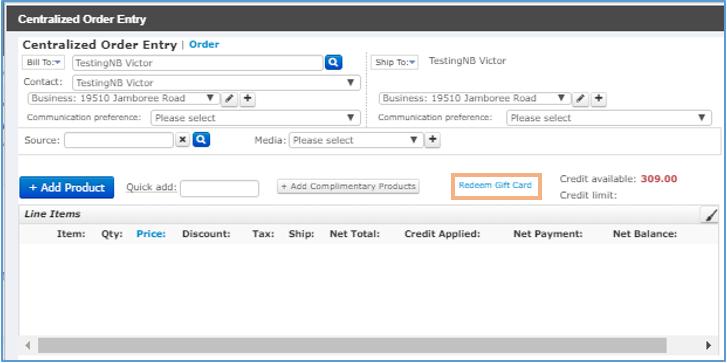
Important! Make sure the system option GiftCardProductTypeGuid has the 2a0b487c-3e0a-45b3-9e1f-036aab6423f9 value in the current setting fields for the gift cards to work. If this system option is blank (it is the default value), then the COE page will not display Redeem Gift Card link.
Adding a Gift Card
Note: A new product type Gift Card is added under the Product Types child form. To add Gift Card as a product type, refer Product Type page.
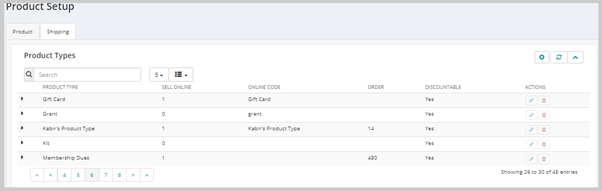
After the gift card product type is setup, you can add or create gift card product as required.
To add a gift card product, refer Adding a Gift Card Product topic.
Purchasing a Gift Card
Once the gift card product is setup, user can purchase the gift card. To purchase the gift card, refer Purchasing a Gift Card through iWeb and Purchasing a Gift Card through eWeb topics.
When the order is saved, a gift card number (unique 16-character code) is generated based on the system option GiftCardNumberCreationMethod.
Redeeming a Gift Card
To redeem a gift card, refer Redeeming a Gift Card through iWeb and Redeeming a Gift Card through eWeb topics.
Once the gift card is redeemed by an individual or organization, the credit available of the redeemer will increase for the redemption's amount.