Evaluation Tab
Event Evaluation
The Evaluation tab can be used to track the evaluations/scores received from a registrant for the event, the speaker(s) associated to the event or session, and the event associated session(s). This section describes the child forms available on this tab and the steps on how to enter the evaluation for an event, event speaker(s), and associated session(s).
Note: Anonymous evaluations are not supported.
The Evaluation tab includes the following child forms:

Evaluation Tab
Event Evaluation Average
The Event Evaluation Average child form can be used to evaluate or view the evaluation details of an event. On clicking the  icon on the child form, the Evaluations grandchild form expands which displays the registrants (along with the given evaluation scores) who have participated and completed the evaluation task.
To evaluate an event:
Important! Each evaluation must be related to a specific registrant.
-
Click the Add New Record button on the Evaluations grandchild form.
-
Fill the Event Evaluation form by rating the overall event based on the registrant's experience and click Save.
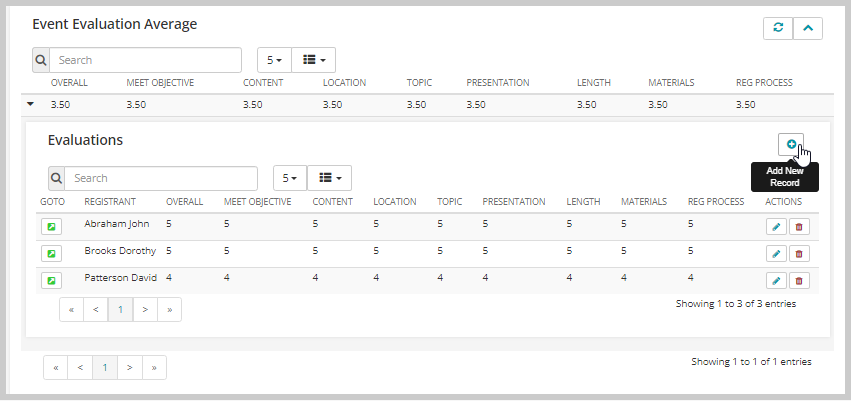
The Event Evaluation form opens.

Important! Along with the evaluation scores from the Evaluations grandchild form, the Event Evaluation Average child form also considers the evaluation scores from the Speaker Evaluation Average and Session Evaluation Averages child forms for the calculation of overall event rating. So, every time an event, speaker, and/or session evaluation is completed, the Event Evaluation Average child form updates the respective column accordingly.
Speaker Evaluation Average
The Speaker Evaluation Average child form can be used to evaluate or view the evaluation details of a speaker associated with an event or session. On clicking the icon on the child form, the Speaker Evaluation grandchild form expands which displays the registrants (along with the given evaluation scores) who have participated and completed the evaluation task.
To evaluate a speaker of an event:
Important! Each evaluation must be related to a specific registrant.
-
Click the Add New Record button on the Speaker Evaluation grandchild form.
-
Fill the Speaker Evaluation form by rating the speaker based on the registrant's attended event or session experience and click Save.

The Speaker Evaluation form opens.

Note: The Speaker Evaluation Average child form consolidates all attendees’ evaluation scores from the Speaker Evaluation grandchild form and displays the average value of it in the respective columns.
Session Evaluation Averages
The Session Evaluation Averages child form can be used to evaluate or view the evaluation details of a session associated with an event. On clicking the icon on the child form, the Session Evaluation grandchild form expands which displays the registrants (along with their evaluation scores) who have participated and completed the evaluation task.
To evaluate a session:
Important! Each evaluation must be related to a specific registrant.
-
Click the Add New Record button on the Session Evaluation grandchild form.
-
Fill the Session Evaluation form by rating the session based on the registrant's session experience and click Save.
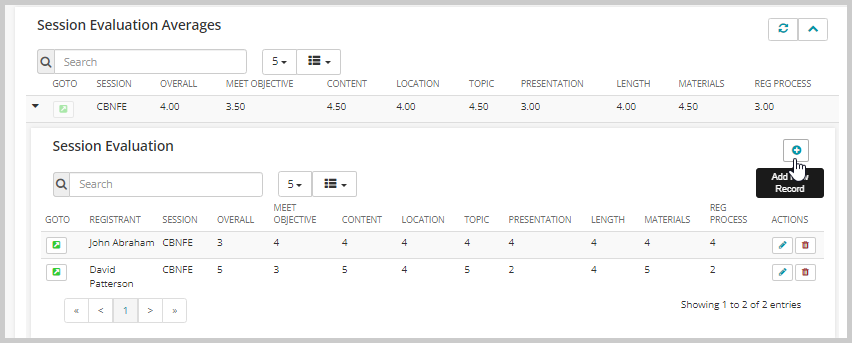
The Session Evaluation form opens.
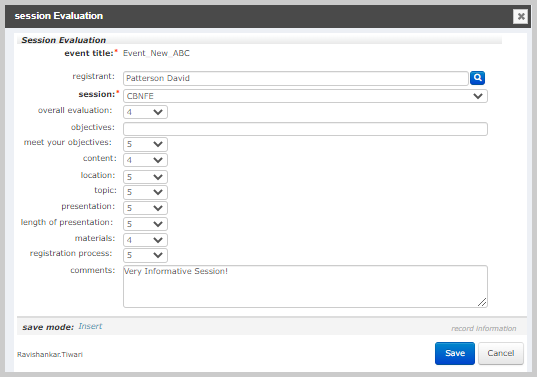
Note: The Session Evaluation Averages child form consolidates all attendees’ evaluation scores from the Session Evaluation grandchild form and displays the average value of it in the respective columns.