Viewing an Event Statistics Report
Event Statistics report displays the number of registrants enrolled for the event and the financial details related to the event.
The Event Statistics report displays data only if the SQL server contains valid user.
Use the below SQL to create a user to execute the report.
CREATE USER netForumReadOnly WITHOUT LOGIN
EXEC sp_addrolemember 'db_datareader', 'netForumReadOnly';
GRANT EXECUTE ON OBJECT::dbo.rpt_ev_event_statistics to netForumReadOnly;
To view an Event Statistics report:
- Go to the Events module and expand the Event Planning group item.
- From the available group item links, use the Find Event or List Active Events group item link to locate your event.
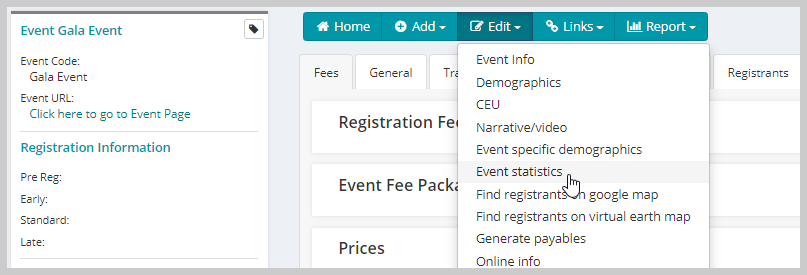
- On the Event Profile page, click the Edit menu bar and from the drop-down list click the Event Statistics link.
This displays the Event Statistics report with event related data in a new tab.
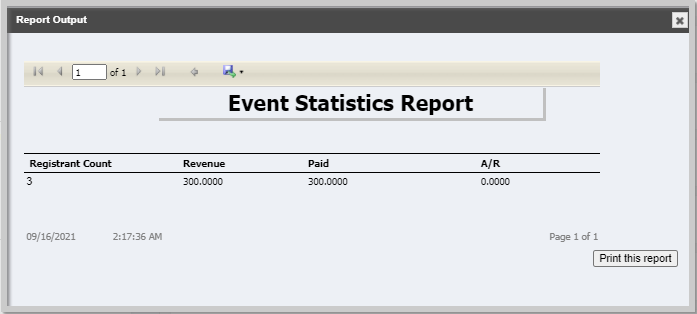
Note: The Event Statistics report does not include tax amount in the revenue column.
Important! For an Event Statistics report, voiding an event invoice is not a preferred practice, because it does not update the registrant count in the Event Statistics report. The preferred practice is to cancel an event registrant using Registrant Actions > Cancel from the Events Registrant profile. This updates the registrant count column correctly with other financial details in the Event Statistics report.